
DocxFlex for Excel and PowerPoint is on the way.Register interest →
DocxFlex for Word Available now

Your brand,
built into Word.

Approved templates, content blocks, images and styles in a sidebar right next to the page. Your team builds on-brand documents without leaving Word.

Windows · Mac · Word for the web

  1. Fonts
  2. Logo
  3. Bio
  4. Table

Fonts gone rogue again? Apply your style profile in one click.

The old logo crept back in? Drop in the approved one from Assets.

Someone used the 2019 bio? Insert the current one from Blocks.

Tables all over the place? Apply your table style. Done.

Try it yourself.
Fix this proposal in four moves.

Drag the approved logo and bio onto the page, then apply the styles. This is how fast your team works with DocxFlex.

Proposal · Bridge Load Rating Program

04  Project team

Project Team.

Kestrel Point Engineering is pleased to submit this proposal for the Bridge Load Rating Program. Our team brings decades of experience across bridges, roads and public infrastructure.

Mia ReynoldsDirector · CPEng RPEQ NER

Mia has over 15 years’ experience as a civil and structural engineer delivering infrastructure, industrial and energy projects.

Our team (2019)

Priya Shah, Undergraduate Engineer. Priya joined the firm in 2019 and is currently completing studies…

Daniel OkaforSenior Civil Engineer · CPEng RPEQ NER

Daniel has over 16 years’ experience across consulting and local government, specialising in transport infrastructure.

StageWeeksFee
Planning4$18,400
Design8$46,200
Verification3$12,900
On brand

Four tabs.
Everything on brand.

  1. Bios, case studies, methodology, safety statements and boilerplate. Search or filter by category, then insert straight into the open document.

    Try it yourself
  2. Logos, headshots and project photos, tagged and approved. Drag one onto the page and it lands at the right size.

    Drag one in
  3. Proposals, capability statements, tender responses and letterheads, redesigned by our brand specialists. Open a fresh copy in one click.

    How setup works
  4. Style profiles hold your fonts, colours, spacing, tables and bullets. Apply them to any document, including text pasted in from somewhere else.

    Apply a style

Built for the whole team,
not just the designer.

Methodology

Our inspection team follows a staged approach: desktop review, visual inspection, load testing and a verified rating report for every structure.

Each stage is signed off by a registered engineer before the next begins.

Capture selection
  • Methodology — Bridge inspectionsSaved just now New
  • Scope of Works — StandardIn scope, out of scope
  • The Kestrel AdvantageValues section
Methodology

Capture a section

Select good writing in Word and save it to the library for everyone.

DocxFlex Central
Logo — primaryv3v4

Every sidebar on the latest approved version

Refresh to the latest

When an admin updates the library, one refresh brings every sidebar up to date.

Windows
Project Team.

Kestrel Point Engineering is pleased to submit this proposal.

BlocksAssetsStyles
Mac
Project Team.

Kestrel Point Engineering is pleased to submit this proposal.

BlocksAssetsStyles
Word for the web
Project Team.

Kestrel Point Engineering is pleased to submit this proposal.

BlocksAssetsStyles

Windows, Mac and web

The same sidebar and the same library, wherever your team opens Word.

One library,
managed in one place.

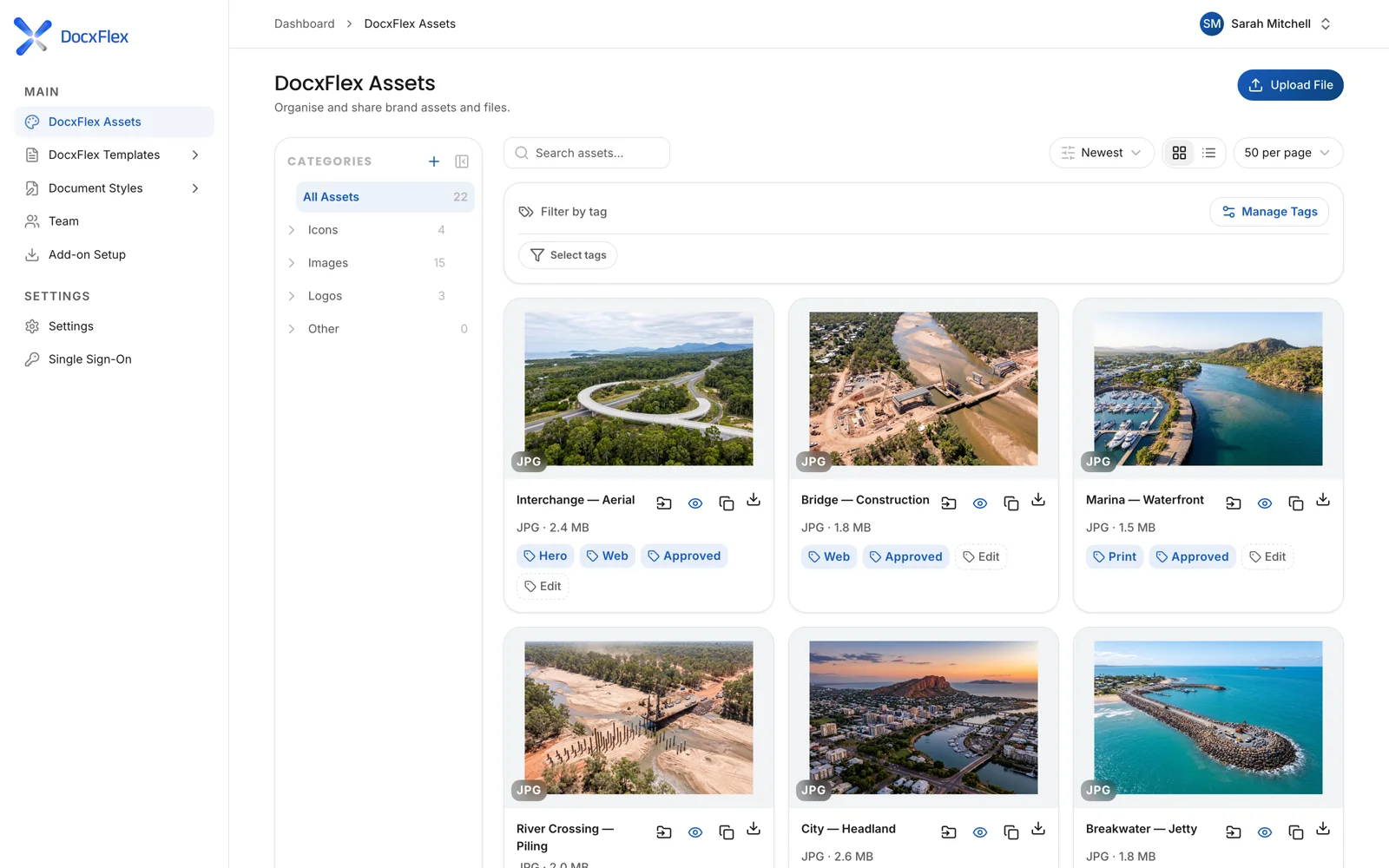
Everything in the Word sidebar comes from DocxFlex Central. Your admins update a template, block or image once, and every sidebar gets the approved version.

  • Retire old logos and templates for everyone at once
  • Style profiles hold your fonts, colours, tables and bullets
  • Roles decide who can change the library
Explore DocxFlex Central
DocxFlex Central
The Assets library in DocxFlex Central, with approved logos and photos

Up and running
in three steps.

We set up your library with you first. Then your team gets to work.

  1. 1

    Add DocxFlex to Word

    We help your IT team add the DocxFlex add-in for everyone, on Windows, Mac and Word for the web.

  2. 2

    Sign in

    Your team signs in with a DocxFlex login or with Microsoft single sign-on.

  3. 3

    Open the sidebar

    Your approved templates, content blocks, images and styles are waiting, right next to the page.

See how setup works

Questions from IT?
We’ve got answers.

Australian hosted

Built, hosted and supported in Australia.

Microsoft single sign-on

Or a DocxFlex login. Team roles decide who can change the library.

Works alongside SharePoint

Your files stay where they are. DocxFlex manages the approved library.

Every plan includes DocxFlex for WordFrom $99 a month per organisation, plus a one-off Launch Package. All prices AUD ex GST.
Security and ITSee pricing

Word questions,
answered.

Anything else? Call 1300 799 858.

Which versions of Word does it work with?

DocxFlex works inside Microsoft Word on Windows, Mac and Word for the web.

How does my team sign in?

With a DocxFlex login or with Microsoft single sign-on.

Does DocxFlex change documents we already have?

Only when someone applies a style or inserts content. Open any document, apply your style profile, and it picks up your approved fonts, colours and table styles.

Who updates the library?

Your admins, in DocxFlex Central. Change a block, image or template once and every sidebar gets the latest approved version.

Can people save their own content?

Yes. Select a section in Word and capture it into the library so the rest of the team can reuse it.

See it with
your documents.

Book a 20-minute demo and see your own documents working in DocxFlex.